Connecting Panels to the Network
| Note: | Use Cat 5/6e cable. |
| Note: | Connect to the port labeled 'Ethernet' or 'LAN' on the panel. |
| Note: | The panels can use DHCP for fast and easy set up. |
I.V. port type
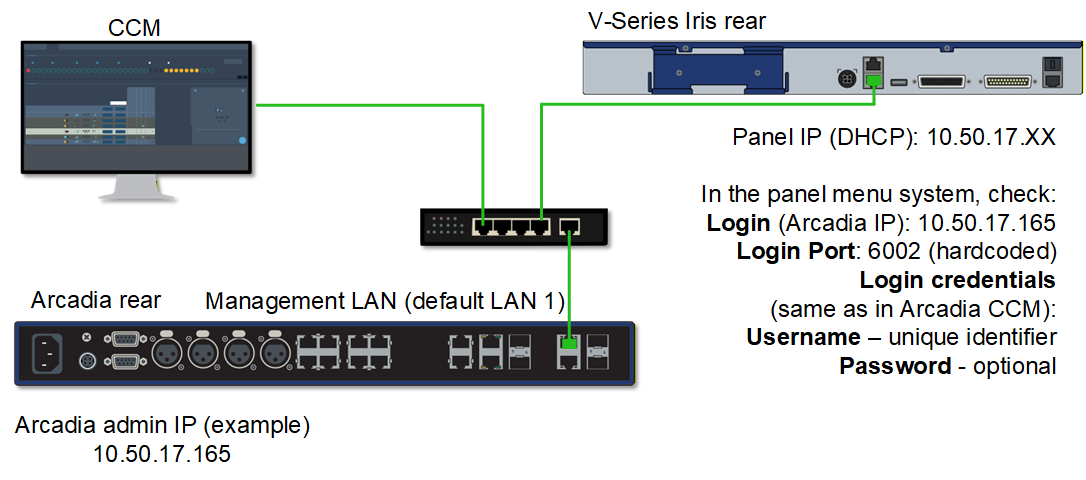
For the panel to connect to Arcadia:
The devices must be able to reach each other over the network
The panel must have:
The Arcadia IP address (Management LAN, default = LAN 1)
Login Port: 6002
Username and password, exactly as configured in the CCM
These details are viewed and edited in the panel menu system.
AES67 port type
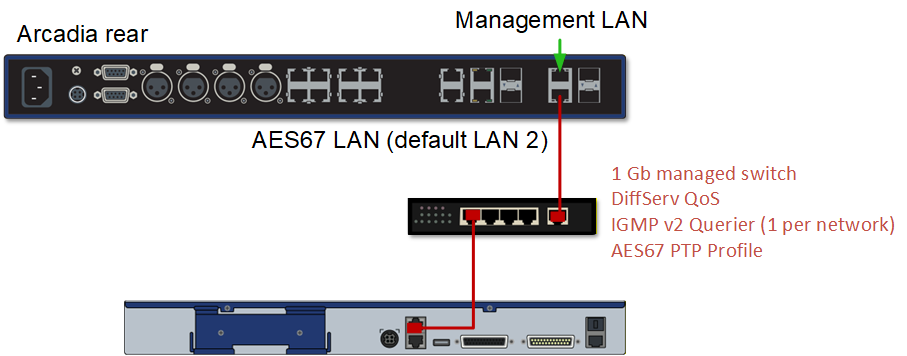
The panel must be connected to a correctly configured AES67 network.
| Note: | If the panel does not have a static IP address and does not find a DHCP server on the network, it will connect in Link-Local. This is not recommended for ongoing use. |
For the panel to connect to Arcadia:
The host and panels must be on the same VLAN
The panel must have:
Login Port: 6001 (hardcoded)
View and edit panel network details in the panel menu system.